How to Connect Your Exness MT5 Account to TradeTerminal
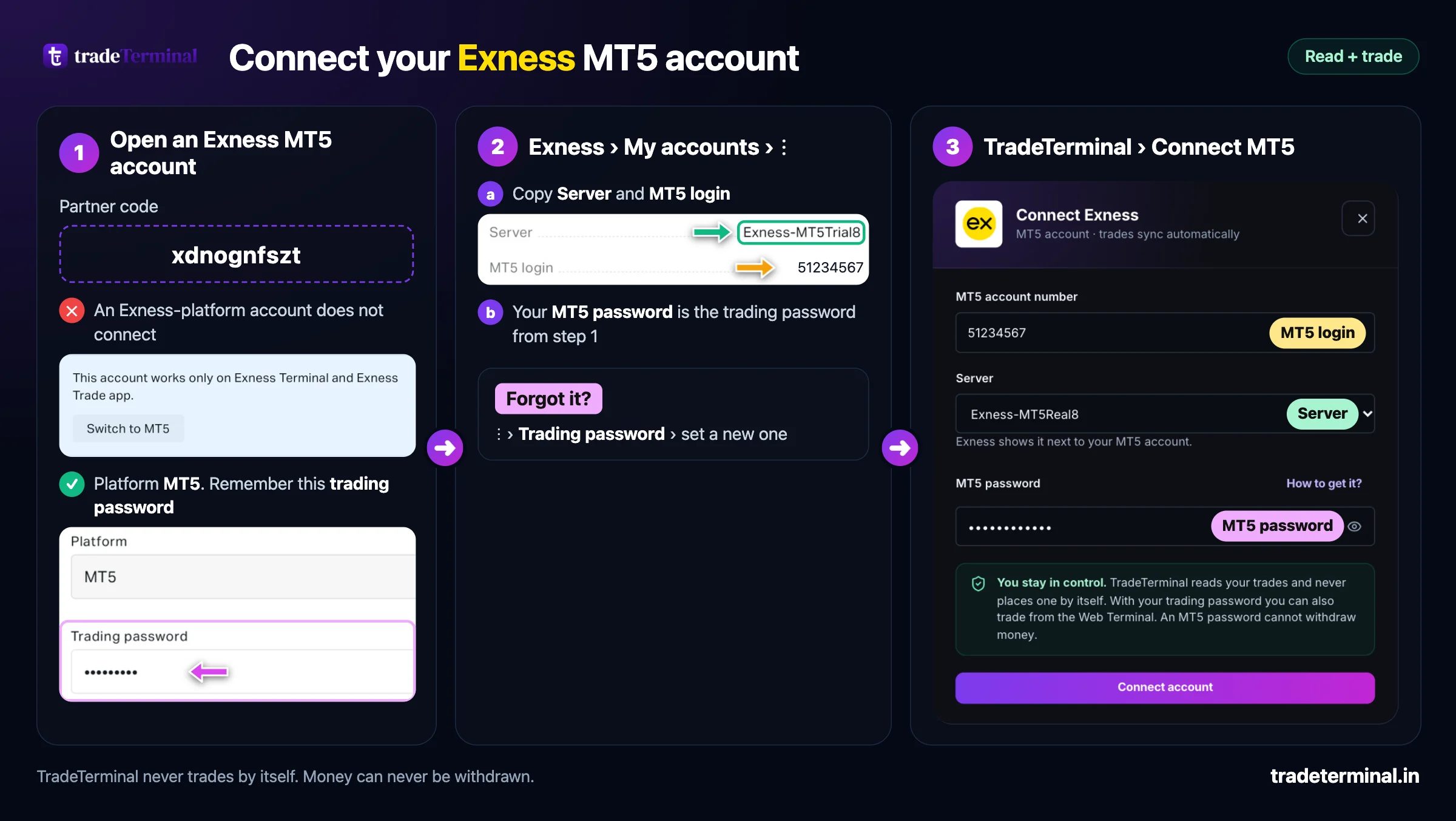
Connecting your Exness account takes about five minutes. You need three details from Exness: the MT5 login, the server and the MT5 password. You do not need to open the MT5 app.
Step 1: find your three details in Exness
First, open your Exness Personal Area and go to My accounts.
- Open the account card of your MT5 account. The Server and the MT5 login are shown on it.
- Your MT5 password is the trading password you set when you opened the account.
- Forgot it? Press the three dots on the account card, choose Trading password and set a new one.
- To keep the connection read-only, choose Read-only access in the same menu and use that password instead.
An account marked "This account works only on Exness Terminal and Exness Trade app" is not an MT5 account and cannot be connected. Open a new account and choose MT5 as the platform.
Step 2: connect it in TradeTerminal
- In TradeTerminal open Supported Brokers. On a phone, tap More, then Supported Brokers.
- On the Exness card press Connect MT5.
- Enter your Exness account UID when TradeTerminal asks for it. It is checked once for each new account, usually within about 10 minutes.
- Type the MT5 login, choose or type the server, and type the MT5 password.
- Press Connect account.
When the account shows Connected, press Sync to bring in your trades. An MT5 account can be synced twice a day.
What TradeTerminal can do with the password
- TradeTerminal reads your trades and balance and never places a trade by itself.
- With your trading password you can also place and close trades yourself from the Web Terminal.
- With the read-only (investor) password the connection can only read.
- An MT5 password cannot withdraw money.
If it does not connect
- "Login or MT5 password is wrong": check the login and server letter by letter, set a new password in Exness and try again.
- Your server is not in the list: choose "My server is not listed" and type it exactly as Exness shows it.
- UID not approved: the account must be opened with the TradeTerminal partner link for Exness.
The account number in the picture (51234567) is a sample.